Mini-Window
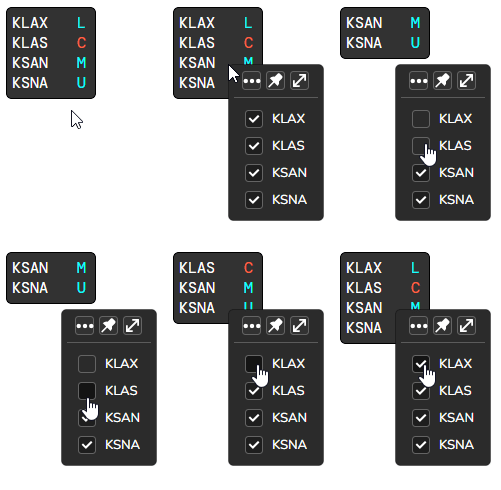
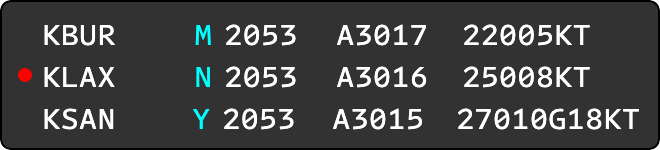
The Mini-Window offers a streamlined display of the current ATIS letter, wind, and altimeter for connected ATIS stations. Stations you are hosting will have a cyan ATIS letter, while other stations will be shown in red.
Window Controls
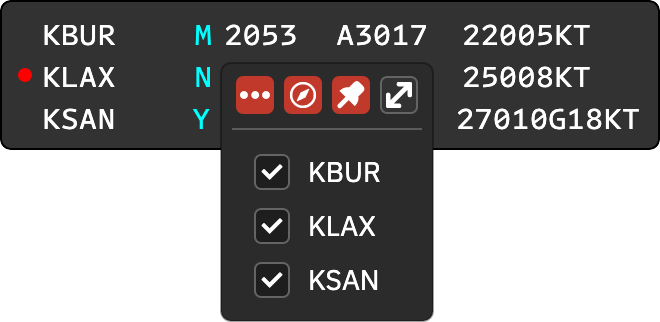
Right-click on the window to open the window controls context menu.
- Click the three-dots icon to hide detailed ATIS information for a more compact view.
- Click the compass icon to show the wind with magnetic variation applied. This only changes stations that have a magnetic variation configured on the Wind formatting tab.
- Click the pin icon to keep the window on top.
- Click the double arrow icon to restore the full vATIS window.
The menu also lists your online stations. Check or uncheck a station to show or hide it in the Mini-Window.
Voice ATIS Recording Indicator
For stations configured for Voice Recorded ATIS, a small red dot is shown at the left of the station’s row when the voice ATIS needs to be recorded again. Hover over it to see “Voice ATIS needs recording”.
Acknowledge ATIS Update
When a new ATIS update is available, the ATIS letter will blink. Click the blinking letter to acknowledge the update. To acknowledge all blinking ATIS letters at once, you can also middle-click on any blinking letter.
Filter ATIS Stations
To view only specific online ATIS stations, right-click the window and check or uncheck the stations you want to show or hide.